Independent public comparison
We asked SeatGeek and StubHub to find two adjacent tickets for the same Los Angeles Dodgers at San Francisco Giants game at Oracle Park on 25 September 2026, then continued to the email step without signing in or paying. We are not affiliated with either marketplace. This records the public journeys and prices visible on 25 September 2026.
The ticket-buying test
Find two adjacent tickets for Dodgers at Giants, Friday 25 September 2026 at 7:15pm, inspect the price and continue to the final safe step before identity or payment.
View Box 328, Row D, seats 15–16. The list rounded to US$62 each including fees; checkout showed US$122.50 total.
Section B142, Row 22, two seats together. The Australian-localised checkout showed AU$146 total after AU$2 tax.
Oracle Park, San Francisco. Different live resale listings were used, so this compares the journey rather than ticket value.
The email step. We did not submit a valid address, sign in, enter payment details or buy tickets.
Desktop Chrome. Inventory, prices, exchange rates, urgency messages and delivery terms can change while a visitor is browsing.
The 30-second result
SeatGeek made the real total easier to understand before asking for identity.
SeatGeek wins this public journey. Its listing price already included fees, the detail panel preserved the seat view and delivery context, and checkout itemised the base ticket, fee and US$122.50 total on the same screen as the email field. StubHub also showed fee-inclusive list prices and a useful order summary, but opened a separate timed checkout, switched the US event into Australian dollars and added AU$1 tax per ticket after a card labelled “incl. fees”.
Both found the event, but SeatGeek shortened discovery
SeatGeek placed the exact game in the public home-page event set, so one selection reached the ticket map. StubHub required a search for the matchup and date, then offered the exact event in its suggestion list. Both routes preserved the teams, date, time and Oracle Park context after arrival.
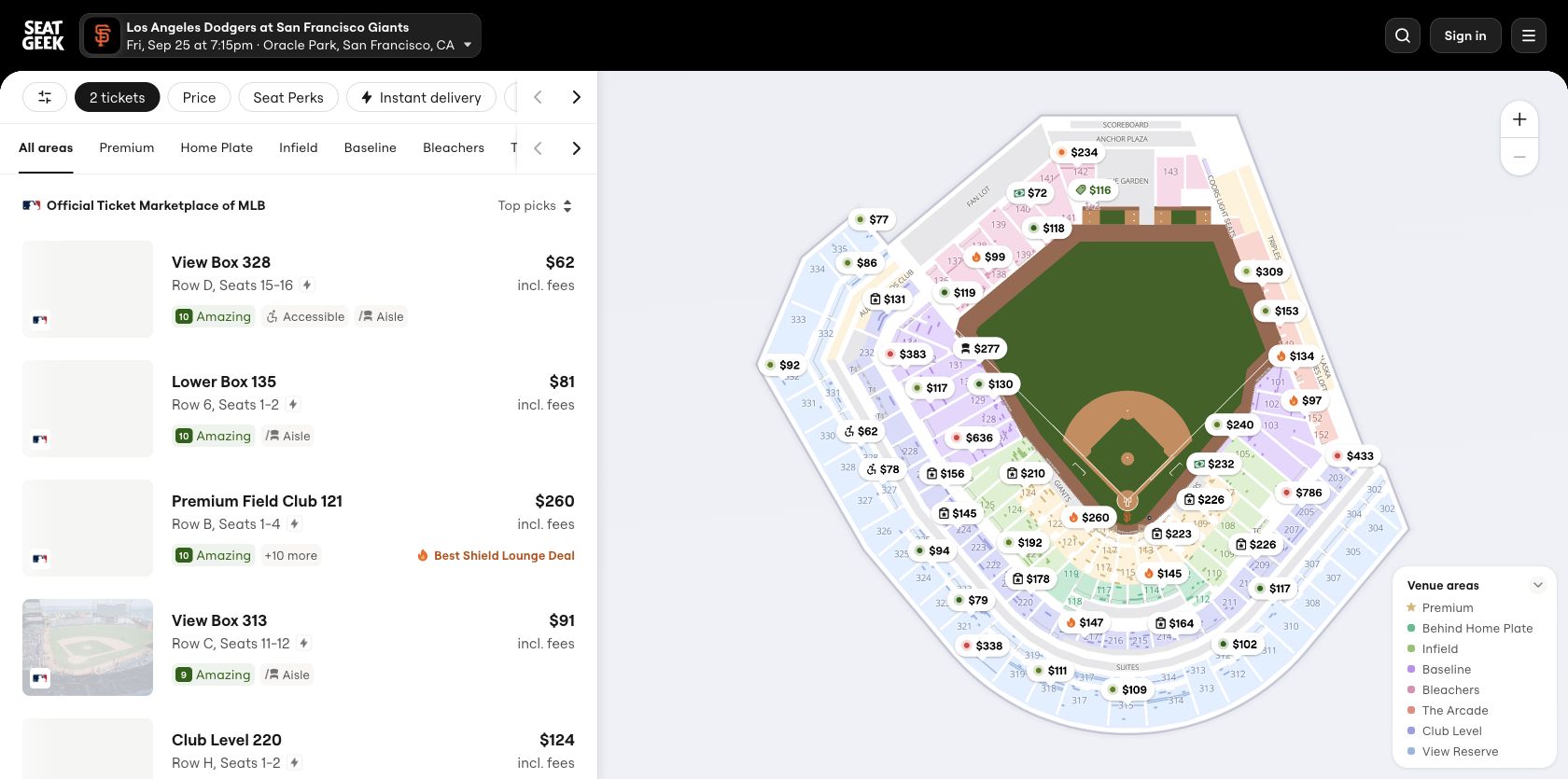
The event pages took different visual approaches. SeatGeek divided the viewport between a scannable listing column and a large labelled map. StubHub initially devoted most of the page to the map and a narrower listing rail; during one captured load that map area remained blank while ticket cards were usable. It subsequently rendered, but the empty first state weakened confidence.
Round winner / SeatGeek
The exact event was one selection away and the initial map/list balance made comparison efficient.
SeatGeek explained the selected seats without losing the map
Selecting SeatGeek’s View Box 328 listing opened a detail panel with the row, seats 15–16, a real-view image, “US$62 each incl. fees”, instant-delivery status, accessibility status and a claim that it was the cheapest listing in that section. The continuation control sat beside the ticket count and seat numbers, so the action and its object stayed connected.
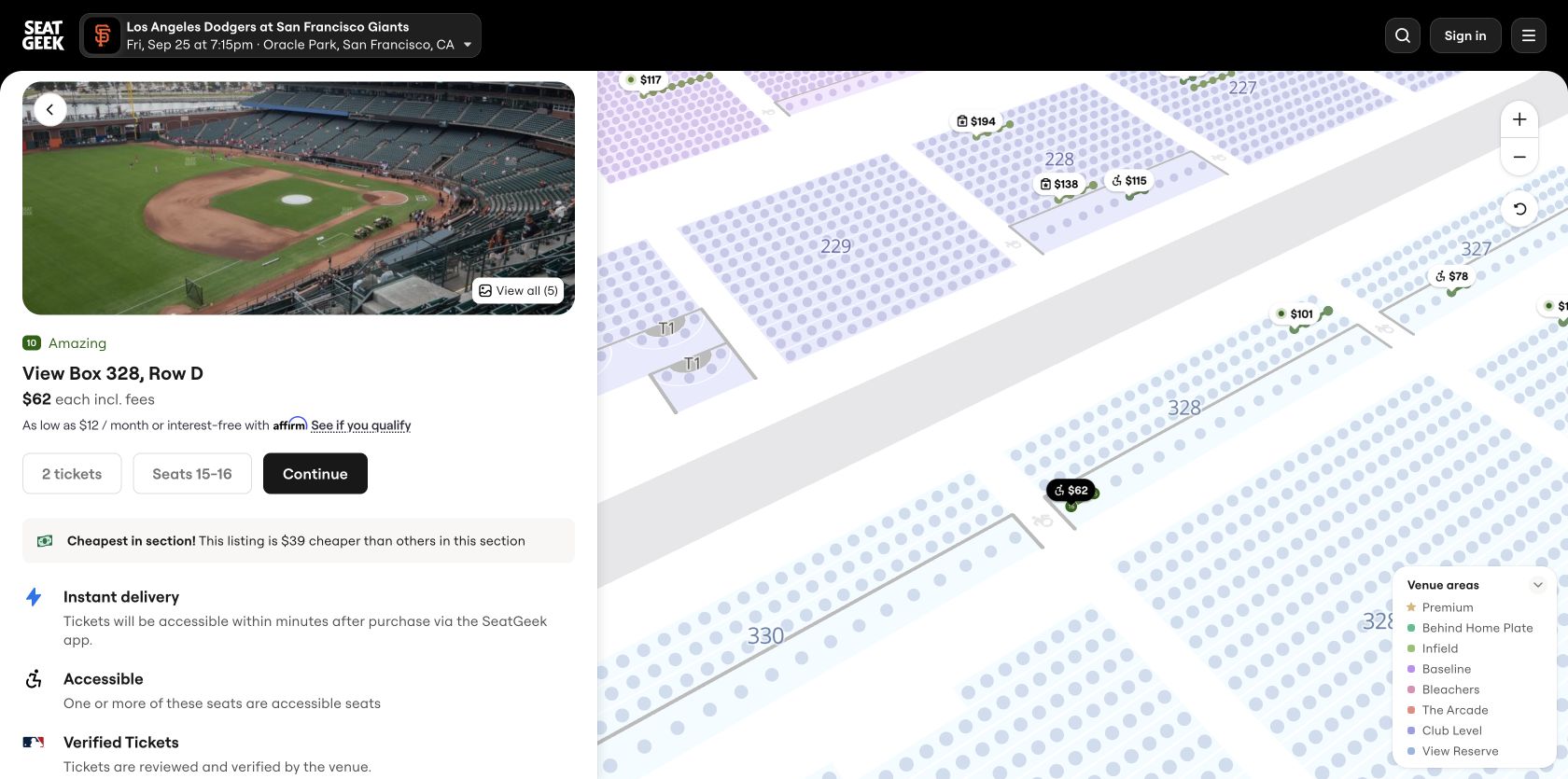
Because these were accessible seats, SeatGeek inserted a specific confirmation explaining who the seats were intended for before checkout. That extra step was appropriate error prevention, not generic friction. StubHub asked for quantity in a modal, then launched the chosen offer into a new checkout tab with a ten-minute price lock. The lock protected the listing, but it also introduced time pressure before identity.
Round winner / SeatGeek
Seat, delivery and accessibility details appeared together before commitment; StubHub split quantity, offer and checkout across more transitions.
Both exposed a total, but only one reconciled it cleanly
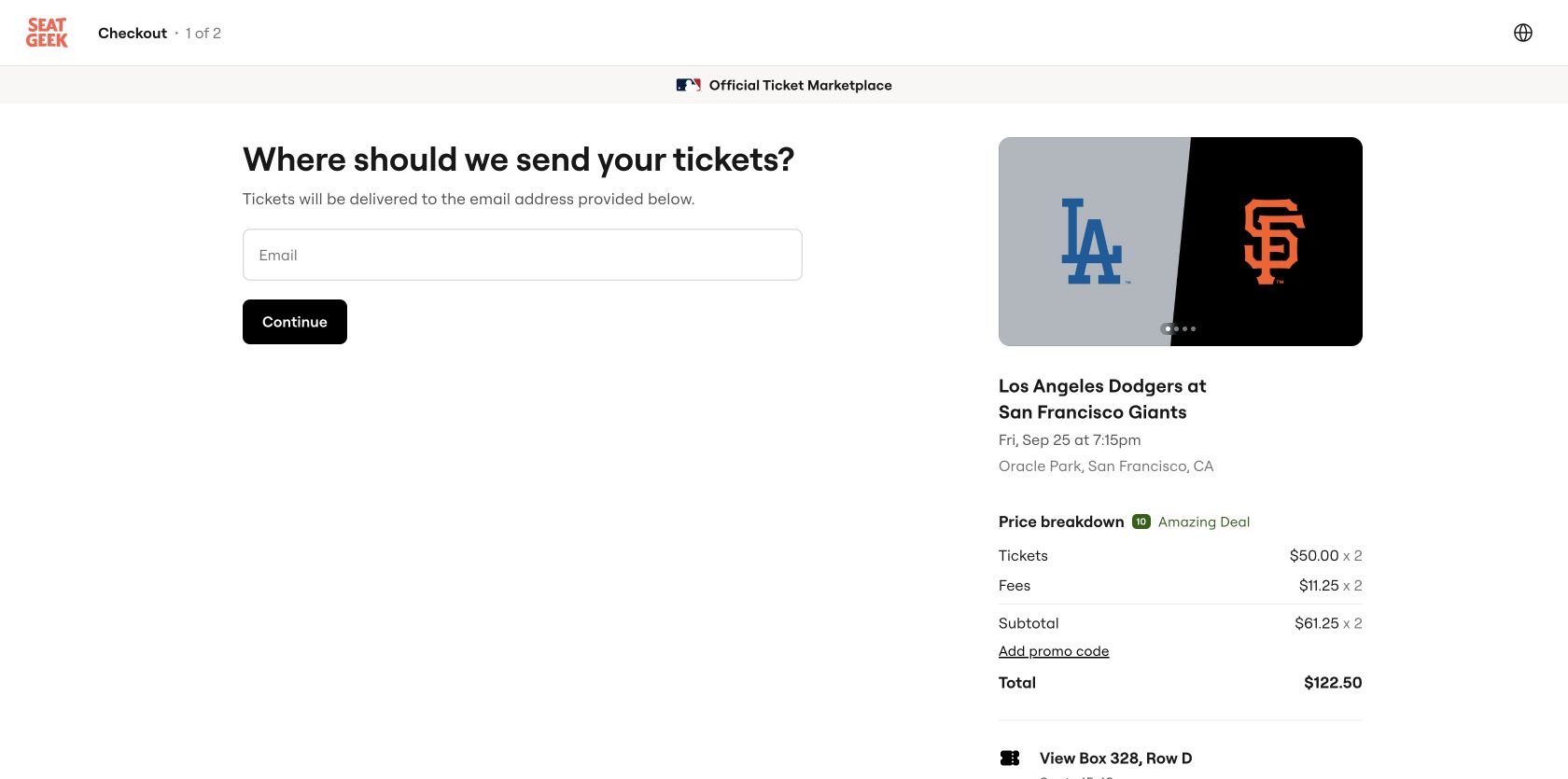
SeatGeek’s checkout showed the arithmetic without another interaction: US$50.00 ticket plus US$11.25 fee per seat, US$61.25 subtotal per seat and US$122.50 total for two. The event, date, venue and View Box 328 selection remained on the same page. The list’s rounded US$62 price therefore became fully explainable.
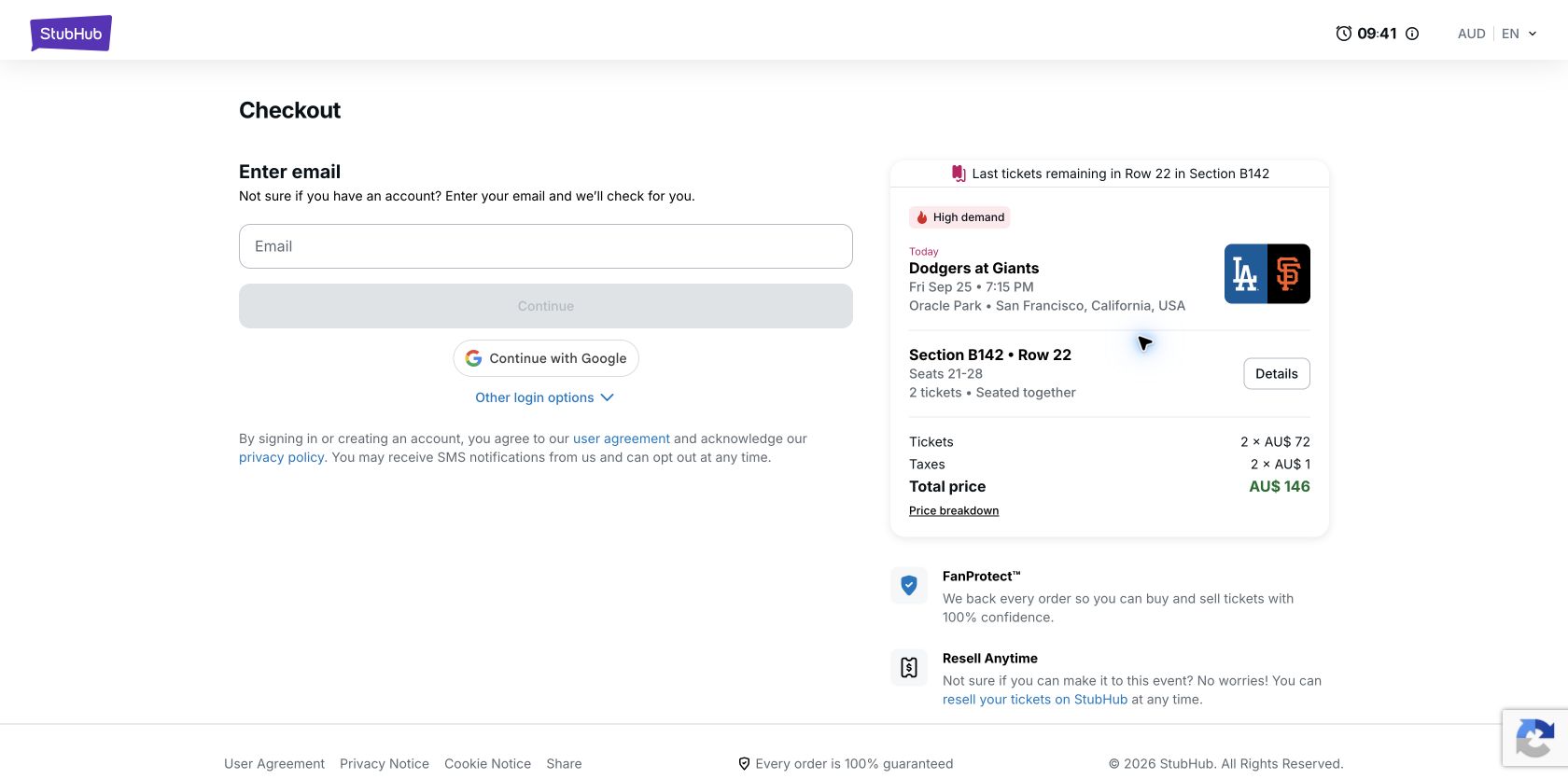
StubHub’s selected listing was advertised at A$72 each including fees. Checkout then itemised two tickets at AU$72 and tax at AU$1 per ticket, producing AU$146. The total was visible and the AU$2 difference was small, but “incl. fees” did not mean the amount was final. The checkout also used an Australian currency and locale for a US event, which may be useful for an Australian visitor but makes cross-market price comparison harder unless the conversion basis is explained.
Round winner / SeatGeek
The total, fee and per-ticket arithmetic agreed on one screen, without a timer or new-tab handoff.
The recovery test produced clear, local email errors
Submitting SeatGeek’s empty email field produced “Email address is invalid”, placed immediately below the field with an error border and icon. StubHub disabled Continue while the field was empty; entering “not-an-email” produced “Please enter a valid email address” beside the field and kept Continue disabled. Both preserved the ticket summary and total, and neither discarded progress.
StubHub’s prevention-first pattern has a slight advantage because an invalid state cannot be submitted. SeatGeek’s message is still direct and visually connected, although “required” would be more precise for an untouched empty field. We corrected neither value and stopped before identity or payment.
Round edge / StubHub
Continue stayed disabled until the email format was plausible, while the inline message made the correction obvious.
SeatGeek rendered sooner; StubHub responded a little faster
These are 75th-percentile Chrome UX Report figures for the exact public event pages on phones, covering 27 August to 23 September 2026. They describe what real Chrome users experienced on those URLs; they do not prove that the specific listing, modal or checkout screen shown here caused a metric. SeatGeek’s largest content arrived well inside the 2.5-second good threshold, while StubHub’s 2.83-second LCP needs improvement. Both INP results exceeded the 200ms good threshold.
We also requested current mobile PageSpeed Insights reports through UX Robot’s configured Google client for both exact pages and both origins on 25 September. No completed Lighthouse result was returned, so no lab score has been substituted. The field data above and the hands-on journey evidence remain independently useful.
All ten Nielsen usability heuristics
Keep the held offer and total visible.
Both retained event and price context; StubHub added a prominent countdown, while SeatGeek kept the flow untimed.
Use one definition of the price.
SeatGeek reconciled ticket and fee amounts. StubHub’s fee-inclusive label still allowed tax to appear later.
Avoid unnecessary context switches.
StubHub opened a separate checkout tab; SeatGeek continued in the current tab and preserved an easier back path.
Make list and checkout totals agree.
SeatGeek rounded the card price but explained the exact figure. StubHub’s later tax weakened the promise implied by “incl. fees”.
Protect special-seat purchases.
SeatGeek’s accessible-seat confirmation prevented accidental misuse; StubHub prevented invalid email continuation.
Carry the selected seats forward.
Both checkouts repeated the event and section. SeatGeek also kept the exact seats and fee composition close to the task.
Let quantity stay editable without restarting.
Both supported two-ticket selection, but StubHub repeated quantity confirmation before reaching email.
Balance map exploration with listing scan.
SeatGeek’s split view used the space more productively; StubHub’s blank map state left a large inactive region.
Keep correction local and preserve progress.
Both email errors appeared beside the field without removing the selected tickets or total.
Explain delivery, guarantees and conversion.
Both explained ticket protection and delivery. StubHub needed clearer help for why this US event was priced in AUD.
What we would change first
Show a final payable price on every ticket card.
What
Include taxes in the headline amount or label the card “fees included, taxes calculated at checkout”.
Where
Listing cards, map pins and the selected-offer panel.
Why
The tested A$72 card became AU$73 per ticket at checkout.
Measure
Price-change exits, checkout reversals and support contacts about fees.
Explain currency and keep checkout in one recoverable context.
What
State the conversion basis before selection and open checkout in the same tab unless the visitor chooses otherwise.
Where
Event header, price filter and Continue transition.
Why
A US event appeared in AUD and a new timed tab increased context switching.
Measure
Currency changes, checkout-tab abandonment and returns to listings.
Profile slow phone interactions on the exact event template.
What
Trace map, filter and listing-panel interactions and reduce long main-thread tasks.
Where
The exact event page, especially map/list synchronisation.
Why
Phone p75 INP was 321ms despite fast rendering and stable layout.
Measure
Element-level INP, filter completion and listing-to-checkout progression.
Make the map useful immediately or collapse its empty state.
What
Reserve the correct map shell, provide a loading state and prioritise the first useful venue layer.
Where
The event-page map and listing split view.
Why
The captured first state left most of the viewport blank, and exact-page LCP was 2.83s.
Measure
Map-ready time, LCP, map interaction rate and ticket-card selection.
What this public comparison cannot see
Live resale inventory changes quickly. The two sites did not offer the same seller, section or currency, so the observed amounts are evidence about disclosure and flow, not a value comparison. We did not submit identity, test delivery, apply promotions, enter payment details or complete a purchase.
We cannot say which journey converts better. With behavioural analytics and completed-order data, UX Robot could connect filter use, map readiness, price changes, validation errors and checkout transitions to purchase completion.